It's not really all that different, is it?
Most of you may remember Windows 95 or 98 as your first exposure to Windows.
Thirty years have passed since then. 30 years!
The baby you were holding then is probably holding your grandchild today.
Windows has changed so much and you're absolutely certain it used to be better and easier, right?
Sorry to tell you not that much has changed for the end user.
Sure, under the hood and behind the scenes there have been an enormous amount of technical changes but barely any of those affect your experience as the end user.
Windows 95/98 (30 years ago):

Here we have:
- a "Start" button bottom left
- shortcut icons on the Desktop
- the Taskbar across the bottom
- the clock bottom right
- a Window running a program (Welcome to Windows 95)
- an "X" in the upper right corner of that Window to close the program
Windows XP (25 years ago):
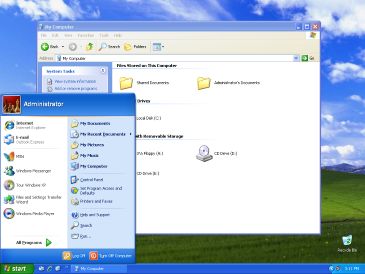
Notice anything familiar?
- a "Start" button bottom left
- shortcut icons on the Desktop
- the Taskbar across the bottom
- the clock bottom right
- a Window running a program (My Computer)
- an "X" in the upper right corner of that Window to close the program
Windows 7 (17 years ago):
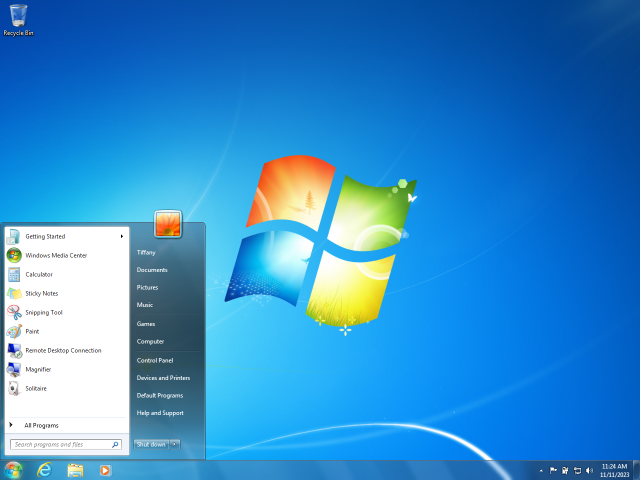
Here's where things get really crazy. The "Start" button doesn't say "Start"!!!!!
Still works though.
- a "Start" button bottom left
- shortcut icons on the Desktop
- the Taskbar across the bottom
- the clock bottom right
- there's no Window open here but trust me, if there was it would have...
- an "X" in the upper right corner of that Window to close the program
To save us all from reliving traumatic memories I'll skip right past Windows 8. Though all of these same, consistent elements were there. They were just buried under a bunch of fancy nonsense nobody liked.
Windows 10 (10 years old):
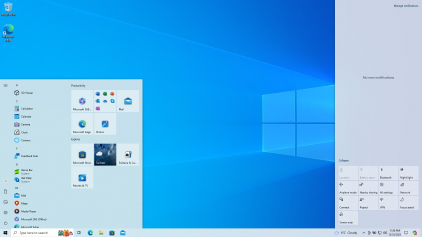
Sensing a pattern:
- a "Start" button bottom left
- shortcut icons on the Desktop
- the Taskbar across the bottom
- the clock bottom right
- there's no Window open here but again, if there was it would have...
- an "X" in the upper right corner of that Window to close the program
That brings us to today and Windows 11 (4 years old):

Okay, if there was ever a time to freak out and panic now is it. The "Start" button is in the middle of the screen instead of the left!!!!!!! Take a deep breath, count to ten and let's take a closer look. We'll find:
- a "Start" button even though it's not in the bottom left
- shortcut icons on the Desktop
- the Taskbar across the bottom
- the clock bottom right
- there's no Window open here but assuredly, if there was it would have...
- an "X" in the upper right corner of that Window to close the program
All this isn't meant to poke fun or make sport of people who obviously have very real troubles getting used to new things. The takeaway here should be that as your software and devices change there are always consistent landmarks and when you are feeling lost or overwhelmed you should focus on those landmarks.
Yes, they moved your "Start" button toward the middle of the screen but it's still a "Start" button and does what it always has done. Sure, now when you click it you see a bunch of stuff you never used to. Okay. So what? Focus on what you recognize and simply ignore what you don't. In time you will learn what these new things do but only if you need to use them. It's very likely you will never need to use the new things and that's perfectly fine. Just ignore them.
Over the last thirty years the colors have changed, the "Start" button got moved and a whole bunch of new things have been tacked on but the structure and function has not changed very much at all.
There is:
- a "Start" button that used to be in the bottom left
- shortcut icons on the Desktop
- the Taskbar across the bottom
- the clock bottom right
- an "X" in the upper right corner of an open Window to close the program
Focus on the familiar. Know you've all been here before. Learn the new stuff slowly if you want to. My guess is you'll get along just fine completely ignoring it.